Blog

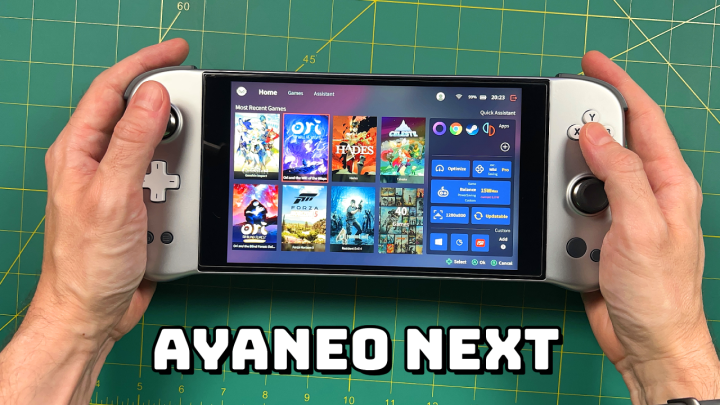
AYANEO NEXT — One Month Later

AYANEO NEXT — One Month Later

The AYANEO Next is launching its IndieGoGo campaign, and so I thought it was time to do an update video to complement the in-depth review video I made last month. In this video we’ll talk about my everyday use of the device, some tips and tricks I’ve learned along the way, and whether this handheld PC is worth its premium price.

More info here
AYANEO links and tools

Continue reading “AYANEO NEXT — One Month Later”

Mini Handheld Comparison: Miyoo Mini vs Anbernic RG280V

Mini Handheld Comparison: Miyoo Mini vs Anbernic RG280V

In this video we’ll compare my two favorite mini handhelds and see which one takes the crown.

Anbernic RG280V
RG280V on Amazon
Adam firmware image
Why I play the RG280V the most

Miyoo Mini
My in-depth review
OnionOS guide and showcase
Miyoo Mini case (the original is currently sold out)

Continue reading “Mini Handheld Comparison: Miyoo Mini vs Anbernic RG280V”

Sega Saturn Update for ArkOS and RetroOZ

Sega Saturn Update for ArkOS and RetroOZ

Last updated: 30JAN2022

Thanks to new updates to their emulators, you can get greatly improved Sega Saturn performance on RG351V, RG351MP, RGB10, ODROID Go Advance, ODROID Go Super, and RGB10 Max devices running ArkOS and RetroOZ. In this guide I’ll show you how to install the new update, configure the emulator, and we’ll take a look at some gameplay, too.

Note that 351ELEC support is planned but not implemented yet.

Continue reading “Sega Saturn Update for ArkOS and RetroOZ”

Miyoo Mini Onion Guide

Miyoo Mini Onion Guide

Last updated: 19FEB2022 (see Changelog for details)

NOTE: There is a new Miyoo Mini v2 guide now available, with updated Onion instructions as well as a guide for installing MiniUI. I recommend using that guide instead.

When it first released last month, I was torn on the Miyoo Mini. It has a cute size, nice display resolution, and can fit in a playing card holster (a VERY important feature). But its software navigation and contrast/sharpness issues with its display left me unsatisfied. Today, we’re going to look at a new community-created OS solution called Onion, which improves the software experience, adds new systems and emulators, and incorporates recent fixes for the screen, too.

Credit for Onion goes to Jim Gray and a wonderful ragtag team of community contributors. They do not have a direct donation set up for the project, but if you are feeling generous, they requested you make a donation with the Mutual Aid Disaster Relief fund in their honor.

Onion is an active work in progress, so expect new features in the future.

To buy the Miyoo Mini, you can grab it via AliExpress or KeepRetro.com. Stock is low right now so expect shipping delays. Additionally, while the device retails for $50, some stores have marked up the price to $60 or higher; it’s going to be up to you whether you are willing to pay that premium or wait until supply better matches demand.

Continue reading “Miyoo Mini Onion Guide”

Beelink SEi8 Review: An Excellent Batocera Mini PC

Beelink SEi8 Review: An Excellent Batocera Mini PC

The Beelink SEi8 is the latest budget mini PC I’ve tested, and the third Beelink I’ve reviewed in as many months. So today let’s see how it stacks up against its more powerful companions and whether the $350 average price tag is worth it. Bottom line: it’s an excellent PC on the Linux and Batocera side, but its Windows performance was mixed.

Beelink SEi8 (Amazon)
Official website

Continue reading “Beelink SEi8 Review: An Excellent Batocera Mini PC”

Retroid Pocket Starter Guide

Retroid Pocket Starter Guide

Last updated: 22MAY2025 (see Changelog for details)

The Retroid Pocket handhelds are seemingly simple devices to set up — they run on Android, so how hard could it be? Well it turns out there are some orientation quirks in getting these handhelds up and running, and so this guide is meant to take you from the very beginning of your journey with the device and take you to the point of being a superstar.

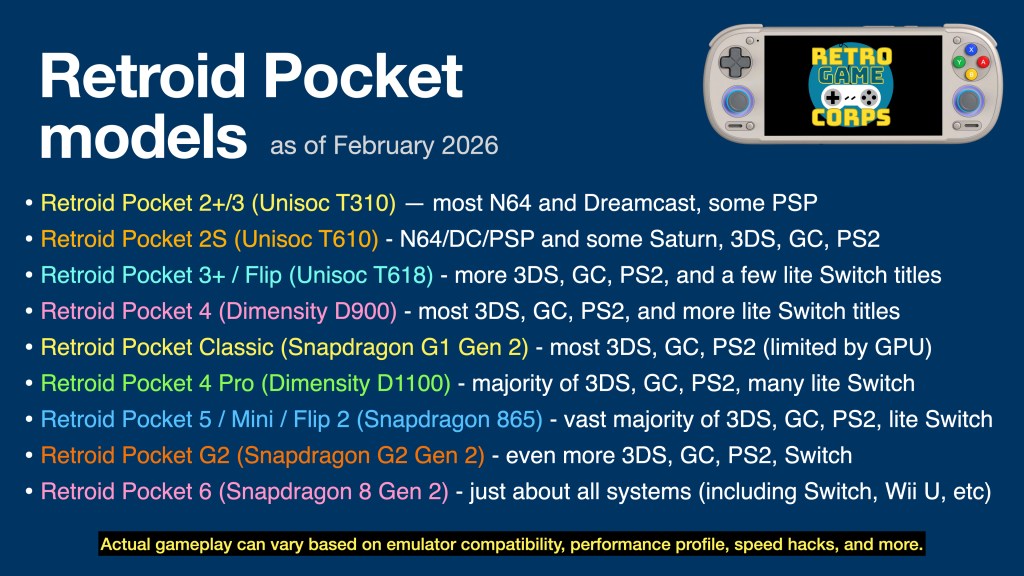
This guide will work for a number of Retroid Pocket devices. The major difference will be the performance for each, which can be summarized in the table below:

I have video reviews for each device on my YouTube channel, which you can find either by checking out my Retroid Pocket playlist or the embedded videos below.

Are the Retroid Pocket devices pre-loaded with games? No, the devices ship as a general Android phone or tablet, with only essential apps (Play Store, Chrome, etc.) pre-installed. You are on your own to find the emulated game files (ROMs) to play on this device. There are no copyrighted files on this website.

Continue reading “Retroid Pocket Starter Guide”