EmulationStation on Steam Deck! Showcase and Guide

EmulationStation on Steam Deck!  Showcase and Guide

Well, that didn’t take long. The desktop version of EmulationStation works really well with the Steam Deck, and allows you to streamline your emulation setup on this impressive handheld. Plus it works in perfect sync with EmuDeck, allowing you to have preconfigured emulation settings AND multiple options when it comes to organizing your ROM library. In this video we’ll go over basic setup, add artwork, and improve how it displays in SteamOS.

Download EmulationStation Desktop Edition here, and be sure to check out their extensive user guide.

Other tools used in this video:
EmuDeck for emulator auto-configuration
SteamGridDB for posters, heroes, grid, and logo images
ScreenScraper.fr to sign up for a free account for scraping images

Note that while I didn’t show it in the video, you can go into Main Menu > Other Settings and adjust the default emulators to your liking. This is helpful if you have a preferred RetroArch core or want to use a standalone emulator.

Continue reading “EmulationStation on Steam Deck! Showcase and Guide”

Introducing EmuDeck: Steam Deck Emulation Configuration Tool!

Introducing EmuDeck: Steam Deck Emulation Configuration Tool!

Let’s check out the new tool called EmuDeck, which will preconfigure all of your Steam Deck emulators and also set up the Steam ROM Manager for you, too. You can have your whole retro library up and running within SteamOS in 20 minutes, complete with fancy game art, customized controls, universal hotkeys, and more.

Check it out here
EmuDeck discord
EmuDeck discussion on Reddit

Continue reading “Introducing EmuDeck: Steam Deck Emulation Configuration Tool!”

Steam Deck Emulation Showcase & Guide

Steam Deck Emulation Showcase & Guide

At this point, what CAN’T the Steam Deck do? In this video we’ll look at the emulation performance of the Steam Deck within its stock SteamOS operating system. We’ll also discuss my findings with getting Batocera running on the handheld.

Links mentioned in the video:
Steam ROM Manager
Batocera installation guide
RetroArch starter guide

Continue reading “Steam Deck Emulation Showcase & Guide”

Valve Steam Deck Impressions: Size, Weight, and Controls

Valve Steam Deck Impressions: Size, Weight, and Controls

I finally have a Steam Deck in hand, and so in this video I will walk you through the experience of holding this popular new device. Is it too big? Why are the controls so high up? Why did they use so much space for those trackpads? Let’s find out together.

Continue reading “Valve Steam Deck Impressions: Size, Weight, and Controls”

My current (simple) 351ELEC setup

My current (simple) 351ELEC setup

Sometimes, less is more. In this video I’ll show you how I’ve pared down my retro game collection to just focus on the games that I actually want to play, and how it has given me the opportunity to just focus on games, and not endless browsing.

Devices that support this setup:
Anbernic RG351P
Anbernic RG351M
Anbernic RG351V
Anbernic RG351MP
PowKiddy RGB10 Pro
PowKiddy RGB10 Max
PowKiddy RGB10 Max 2

351ELEC: https://351elec.de/
ArkOS: https://github.com/christianhaitian/arkos/wiki

Note that while I didn’t explicitly mention it, this same setup can be done within RetroOZ for its supported devices as well. Check out the latest version here.

Continue reading “My current (simple) 351ELEC setup”

RetroArch Starter Guide

RetroArch Starter Guide

Last updated: 11MAR2025 (see Changelog for details)

RetroArch is one of my favorite programs to use for retro game emulation, because it can emulate many systems. But it does have quite a steep learning curve. In this guide I’m going to demystify some of the more peculiar things about this emulation frontend, and show you how I set up RetroArch on my own gaming platforms.

This guide is meant to help you get set up with various RetroArch iterations. The video will primarily be done on Windows PC, but the same method will apply to MacOS, Linux, Android, iOS, Vita, and Xbox platforms, and more.

RetroArch really shines on retro systems, particularly PlayStation 1 and below games. For more modern consoles, it is often more efficient to rely on standalone emulators, which are generally more optimized than RetroArch. However, if you are using a system that relies primarily on RetroArch for emulation (like Xbox), or you have a beefy PC that can run well regardless of optimizations, you may find success in emulating higher-end systems in RetroArch, too.

Continue reading “RetroArch Starter Guide”

AYANEO NEXT — One Month Later

AYANEO NEXT — One Month Later

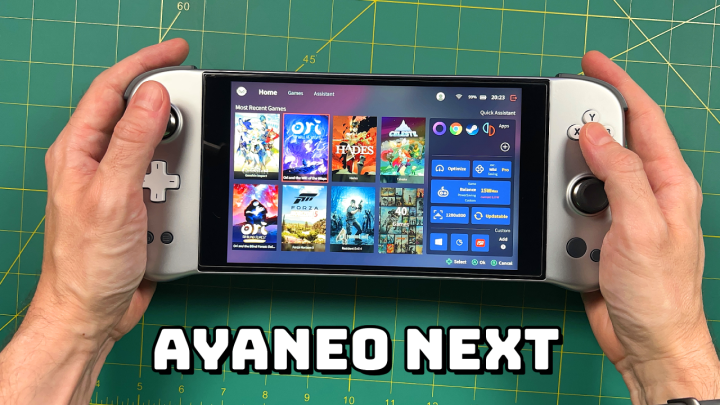
The AYANEO Next is launching its IndieGoGo campaign, and so I thought it was time to do an update video to complement the in-depth review video I made last month. In this video we’ll talk about my everyday use of the device, some tips and tricks I’ve learned along the way, and whether this handheld PC is worth its premium price.

More info here
AYANEO links and tools

Continue reading “AYANEO NEXT — One Month Later”