RetroArch Starter Guide

RetroArch Starter Guide

Last updated: 11MAR2025 (see Changelog for details)

RetroArch is one of my favorite programs to use for retro game emulation, because it can emulate many systems. But it does have quite a steep learning curve. In this guide I’m going to demystify some of the more peculiar things about this emulation frontend, and show you how I set up RetroArch on my own gaming platforms.

This guide is meant to help you get set up with various RetroArch iterations. The video will primarily be done on Windows PC, but the same method will apply to MacOS, Linux, Android, iOS, Vita, and Xbox platforms, and more.

RetroArch really shines on retro systems, particularly PlayStation 1 and below games. For more modern consoles, it is often more efficient to rely on standalone emulators, which are generally more optimized than RetroArch. However, if you are using a system that relies primarily on RetroArch for emulation (like Xbox), or you have a beefy PC that can run well regardless of optimizations, you may find success in emulating higher-end systems in RetroArch, too.

Continue reading “RetroArch Starter Guide”

Mini Handheld Comparison: Miyoo Mini vs Anbernic RG280V

Mini Handheld Comparison: Miyoo Mini vs Anbernic RG280V

In this video we’ll compare my two favorite mini handhelds and see which one takes the crown.

Anbernic RG280V
RG280V on Amazon
Adam firmware image
Why I play the RG280V the most

Miyoo Mini
My in-depth review
OnionOS guide and showcase
Miyoo Mini case (the original is currently sold out)

Continue reading “Mini Handheld Comparison: Miyoo Mini vs Anbernic RG280V”

Sega Saturn Update for ArkOS and RetroOZ

Sega Saturn Update for ArkOS and RetroOZ

Last updated: 30JAN2022

Thanks to new updates to their emulators, you can get greatly improved Sega Saturn performance on RG351V, RG351MP, RGB10, ODROID Go Advance, ODROID Go Super, and RGB10 Max devices running ArkOS and RetroOZ. In this guide I’ll show you how to install the new update, configure the emulator, and we’ll take a look at some gameplay, too.

Note that 351ELEC support is planned but not implemented yet.

Continue reading “Sega Saturn Update for ArkOS and RetroOZ”

Miyoo Mini Onion Guide

Miyoo Mini Onion Guide

Last updated: 19FEB2022 (see Changelog for details)

NOTE: There is a new Miyoo Mini v2 guide now available, with updated Onion instructions as well as a guide for installing MiniUI. I recommend using that guide instead.

When it first released last month, I was torn on the Miyoo Mini. It has a cute size, nice display resolution, and can fit in a playing card holster (a VERY important feature). But its software navigation and contrast/sharpness issues with its display left me unsatisfied. Today, we’re going to look at a new community-created OS solution called Onion, which improves the software experience, adds new systems and emulators, and incorporates recent fixes for the screen, too.

Credit for Onion goes to Jim Gray and a wonderful ragtag team of community contributors. They do not have a direct donation set up for the project, but if you are feeling generous, they requested you make a donation with the Mutual Aid Disaster Relief fund in their honor.

Onion is an active work in progress, so expect new features in the future.

To buy the Miyoo Mini, you can grab it via AliExpress or KeepRetro.com. Stock is low right now so expect shipping delays. Additionally, while the device retails for $50, some stores have marked up the price to $60 or higher; it’s going to be up to you whether you are willing to pay that premium or wait until supply better matches demand.

Continue reading “Miyoo Mini Onion Guide”

Retroid Pocket Starter Guide

Retroid Pocket Starter Guide

Last updated: 19JAN2026 (see Changelog for details)

The Retroid Pocket handhelds are seemingly simple devices to set up — they run on Android, so how hard could it be? Well it turns out there are some orientation quirks in getting these handhelds up and running, and so this guide is meant to take you from the very beginning of your journey with the device and take you to the point of being a superstar.

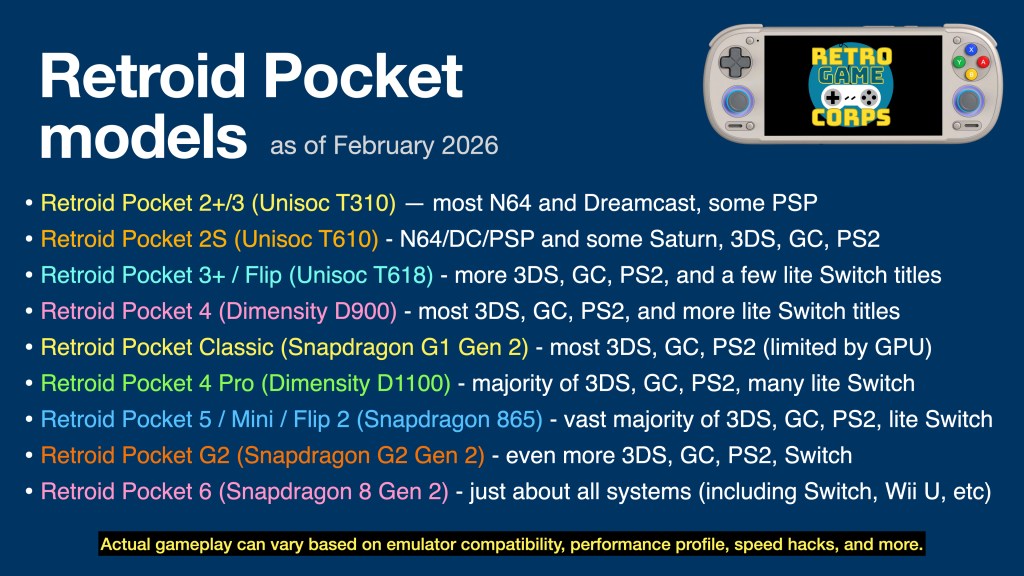
This guide will work for a number of Retroid Pocket devices. The major difference will be the performance for each, which can be summarized in the table below:

I have video reviews for each device on my YouTube channel, which you can find either by checking out my Retroid Pocket playlist or the embedded videos below.

Are the Retroid Pocket devices pre-loaded with games? No, the devices ship as a general Android phone or tablet, with only essential apps (Play Store, Chrome, etc.) pre-installed. You are on your own to find the emulated game files (ROMs) to play on this device. There are no copyrighted files on this website.

Continue reading “Retroid Pocket Starter Guide”

Introducing WebRcade — Play Your Retro Games via the Cloud!

Introducing WebRcade — Play Your Retro Games via the Cloud!

WebRcade is a new browser-based platform that allows you to play your own retro games via cloud storage like DropBox. This will allow you to play your personal library on all sorts of devices — like the iPhone, iPad, Xbox and more. The games all run at full speed and it’s very easy to set up the platform. And it’s 100% open-source and free. In this video I’ll walk you through how it all works!

Find WebRcade here

BackBone One controller (use this link for $10 Apple gift card with purchase)
My 8BitDo Xbox controller video

Continue reading “Introducing WebRcade — Play Your Retro Games via the Cloud!”

Anbernic RG552 Linux Setup Guide

Anbernic RG552 Linux Setup Guide

Last Updated: 27DEC2021 (see Changelog for details)

The Anbernic RG552 is a unique device in that it can boot into both Linux and Android, giving users a wide variety of use cases. In this guide we’ll go over some of your options when it comes to the Linux operating system, including a pre-configured SD card image that you can download and use directly on your device.

Some caveats:

  • The Linux operating system that ships with the device is a modified version of Batocera v29. Several development teams (including the official Batocera team) are already hard at work on updated firmware that will improve the user experience. This guide is meant to be a stop-gap while we wait for proper updated firmware.
  • This guide will show you how to install a pre-configured SD card image you can simply flash an SD card that has all of the changes baked in.
  • I DO NOT recommend flashing this SD card image over your existing 16GB card that came with the device. Keep that one around for safekeeping; instead, I recommend using a SanDisk Ultra 16GB card because it is more reliable and can be found for under $10.
  • If you don’t want to flash a new SD card image, I will also link to a shell script that will provide most of the tweaks to your existing stock firmware.
  • Once custom firmware is available, I will likely NOT recommend using this guide, since updated firmware will likely improve the user experience as well as emulation performance.
  • This updated image will include optimized hotkeys, auto save/load for most systems, scaling, and aspect ratios, plus the ability to download new themes.
  • Big thanks to developers FGL82 and konsumschaf for help with dialing in the proper settings, and TheGreatCrippler for helping shrink down this image to a manageable size.

For now, I would focus on using the Linux interface for PS1 and below gameplay. The emulators on the Android OS side are much more optimized and will give you better performance across the board. Custom firmware might make Linux more performative in the future, but for now I would use Android for Nintendo DS, Dreamcast, PSP, Nintendo 64, Panasonic 3D0, Atari Jaguar, and Nintendo GameCube.

So without any further delay, let’s jump into it.

Continue reading “Anbernic RG552 Linux Setup Guide”

PowKiddy X18S Firmware Upgrade (LineageOS, Android 11)

PowKiddy X18S Firmware Upgrade (LineageOS, Android 11)

In this video I’ll show you how to upgrade the operating system on the PowKiddy X18S to the slim and stable LineageOS from Black Seraph. We’ll also test out emulation performance with this new OS running N64, PSP, Dreamcast, GameCube, PS2, and more.

PowKiddy X18S
Black Seraph’s Patreon
JimRPG’s GameCube settings
Taki Udon’s PS2 settings

Continue reading “PowKiddy X18S Firmware Upgrade (LineageOS, Android 11)”