

The Anbernic Win600 goes on sale starting tomorrow, so here is my final, in-depth review of the device after spending a week with it. It can play Windows 10/11, SteamOS, and Batocera with some impressive results, but is it worth between $300 and $400?
Buy one here (Anbernic official site)
or via AliExpress
Anbernic’s software repo
My Win600 impressions video:
My Win600 final review:
Overclocking the RAM
The stock RAM can be overclocked, which I show in my final review video above. However, I recommend checking out this video from The Phawx for a more in-depth explanation of RAM modification.
By default, the RAM is clocked to 2400MHz no matter what the RAM speed is. If you are using 2666MHz RAM (like what comes with the device), you will want to overclock the RAM to 1333. If upgrading to 3200MHz RAM, set it to 1800 instead.
Running Batocera
If you want to play retro games, I recommend flashing the x86 version of Batocera to a flash drive or m.2 SSD and using that OS for retro game emulation. As you can see in the final review video above, it can emulate up through Wii U with excellent performance (other than PS2, unfortunately, which remains this device’s “white whale”). The process for setting up the Batocera system is similar to this guide.
Once you have loaded Batocera, you will need to rotate the screen to make it fill out appropriately. Here is a tutorial from Batocera on how to do this, which requires you to connect to the OS via Samba share (tutorial here) and then add a custom.sh file to the System folder. After that is complete, go into Main Menu > System Settings > Screen Rotation > 90 Degrees. After rotating the screen, you may need to restart Batocera for the effect to work properly.
WiFi may also not initially work when you first turn it on (you will not see any networks when searching SSIDs). This can also be fixed by restarting Batocera.
When familiarizing yourself with Batocera, I recommend going to the Systems page on their wiki, find and click on the system you are trying to set up, and then see what special instructions are needed.
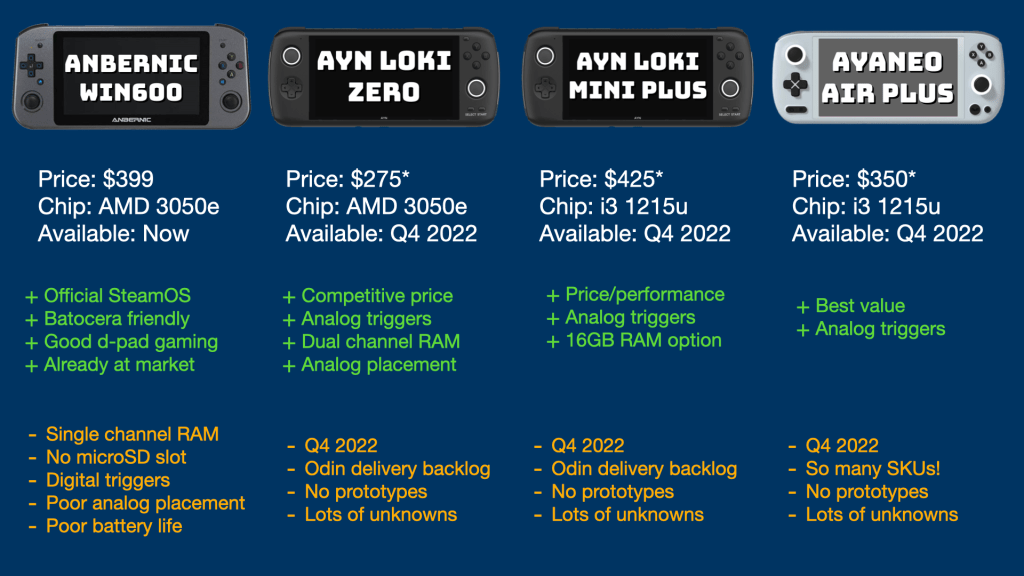
Here is a quick breakdown of similar devices either in terms of specs or pricing. The price for the three on the right includes an estimated shipping, so that price may change depending on your location. Anbernic’s Win600 ships for free but like with all of these devices, it may have import or duty taxes depending on where you live.
 Retro Game Corps
Careful when overclocking the RAM
I used the exact module supplied in the article (16gb 3200) and when I overclock it, the unit no longer functions. Had to take it apart and do a battery pull to reset the BIOS to get it running again. Tried again for a second time, same result. Not sure whats going on there.
LikeLike
its best to buy a 32gb and you have to set the clocking down to single channel specs of 8gb max specsnso it will be running at the sun of 3200 8×4 sticks which is 800mhz it’ll run games better than 8 or 16gb of ram the gb of ram are more important.
LikeLike
Just a shot in the dark but I have been trying to run Xbox on the WIn600 and the Halo games seem to start but then won’t run. Which I have seen people including yourself get it to run but I can’t. I thought maybe the iso was bad but it runs perfectly fine on my steam deck. I also got Vita running in batocera, but when I restarted the system the Vita3k system won’t run anymore and I can’t seem to fix it. Any ideas on both of these issues?
LikeLike